Installing Puppet master and slaves
If you haven’t seen my previous tutorials you should see them:
How to install Puppet, Hello World module using template to Puppet,
Installing Apache and PHP with Puppet module.
I’m using Xubuntu 12.04.03 32bit
Here is tutorial how you create PuppetMaster and two slaves. And how to use three modules using nodes to determine slaves to use different modules.
These are my steps:
First create PuppetMaster, one slave.
Second make sure simple hello module works.
Thirt create new slave and make sure hello module works.
Final create modules what you want and add nodes to determine what slaves uses what modules.
You’ll should install ssh for you master and slave1.
master$ sudo apt-get update
slave1$ sudo apt-get update
master$ sudo apt-get install openssh-server
slave1$ sudo apt-get install openssh-server
You can browse for mDNS/DNS-SD services using the Avahi daemon with command
avahi-browse -ac |lessTake ssh connection and test you can ping your master to slave and slave to master.
master$ ssh slave1@pc13.local
master$ ping -c 1 pc13.local
slave1$ ping -c 1 pc12.local
Install PuppetMaster, stop it, remove old certificates and modify puppet.conf.
master$ sudo apt-get -y install puppetmaster
master$ sudo service puppetmaster stop
master$ sudo rm -r /var/lib/puppet/ssl
master$ sudoedit /etc/puppet/puppet.conf
In conf file you add these lines. ( pc12 is name your masters $hostname )
[master]
dns_alt_names = puppet, pc12.local
Start PuppetMaster
master$ sudo service puppetmaster startInstall Puppet to your slave and edit conf file
slave1$ sudo apt-get -y install puppet
slave1$ sudoedit /etc/puppet/puppet.conf
Add to conf file your masters hostname
[agent]
server = pc12.local
Edit your Puppet to start when booting
slave1$ sudoedit /etc/default/puppet

START=yes
Restart Puppet
slave1$ sudo service puppet restartWhen you have restarted your slave’s Puppet your master needs to confirm connection between slave and master
master$ sudo puppet cert --list
master$ sudo puppet cert --sign pc13.foo.bar.com
Make hellotest module to Puppet
master$ cd /etc/puppet
master$ sudo mkdir -p modules/hellotest/manifests/
master$ sudoedit modules/hellotest/manifests/init.pp

class hellotest {
    file { '/tmp/testModule':
        content => "Come visit Soivi.net!\n"
    }
}
Test that your hellotest module works in your master before sharing it with your slaves
master$ puppet apply --modulepath modules/ -e 'class {"hellotest":}'
$ cat /tmp/testModule
Come visit Soivi.net!
Hellotest module works so you can share it with your slaves
master$ sudoedit manifests/site.pp

class {"hellotest":}
Restart Puppet with your slave so your slave searches new changes what master have done. ( You slaves reloads automatically changes, but now we don’t want to wait it. So that’s why we kick slave1 )
slave1$ sudo service puppet restart

slave1$ cat /tmp/testModule
Come visit Soivi.net!
Now we are confirmed that master and slave1 is working correctly. Now we can configure slave2 working too.
Install ssh, take connection and make sure your ping is working both ways.
slave2$ sudo apt-get update
slave2$ sudo apt-get install openssh-server
master$ ssh slave2@pc11.local
master$ ping -c 1 pc11.local
slave2$ ping -c 1 pc12.local
Install puppet, modify conf file and add same lines that you added before to slave1
slave2$ sudo apt-get -y install puppet
slave2$ sudoedit /etc/puppet/puppet.conf

[agent]
server = pc12.local
Configure puppet to start when booting
slave2$ sudoedit /etc/default/puppet

START=yes
And restart Puppet
slave2$ sudo service puppet restartNow you should see in you master that slave2 is trying to connect you. Confirm it.
master$ sudo puppet cert --list
master$ sudo puppet cert --sign pc11.foo.bar.com
Reload Puppet in your slave2 and your hellotest module should work.
slave2$ sudo service puppet restart
slave2$ cat /tmp/testModule
Come visit Soivi.net!
Now lets make three different modules
First module installs LibreOffice
master$ sudo mkdir -p modules/libreoffice/manifests
master$ sudoedit modules/libreoffice/manifests/init.pp

class libreoffice {
        package {'libreoffice':
                ensure => present,
        }
}
Second installs VLC
master$ sudo mkdir -p modules/vlc/manifests
master$ sudoedit modules/vlc/manifests/init.pp

class vlc {
        package {'vlc':
                ensure => present,
        }
}
Third one is installing Inkscape
master$ sudo mkdir -p modules/inkscape/manifests
master$ sudoedit modules/inkscape/manifests/init.pp

class inkscape {
        package {'inkscape':
                ensure => present,
        }
}
Add to site.pp your three new modules and let’s make two nodes.
master$ sudoedit manifests/site.ppFirst node makes slave1 install LibreOffice and VLC, but not Inkscape
Second node makes slave2 install LibreOffice and Inkscape, but not VLC
class {"libreoffice":}
node 'pc13.foo.bar.com' {
        class {"vlc":}
}
node 'pc11.foo.bar.com' {
        class {"inkscape":}
}
Because we don’t want to wait slaves automatically reload we do it manually.
slave1$ sudo service puppet reload
slave2$ sudo service puppet reload
Slave1 installed softwares
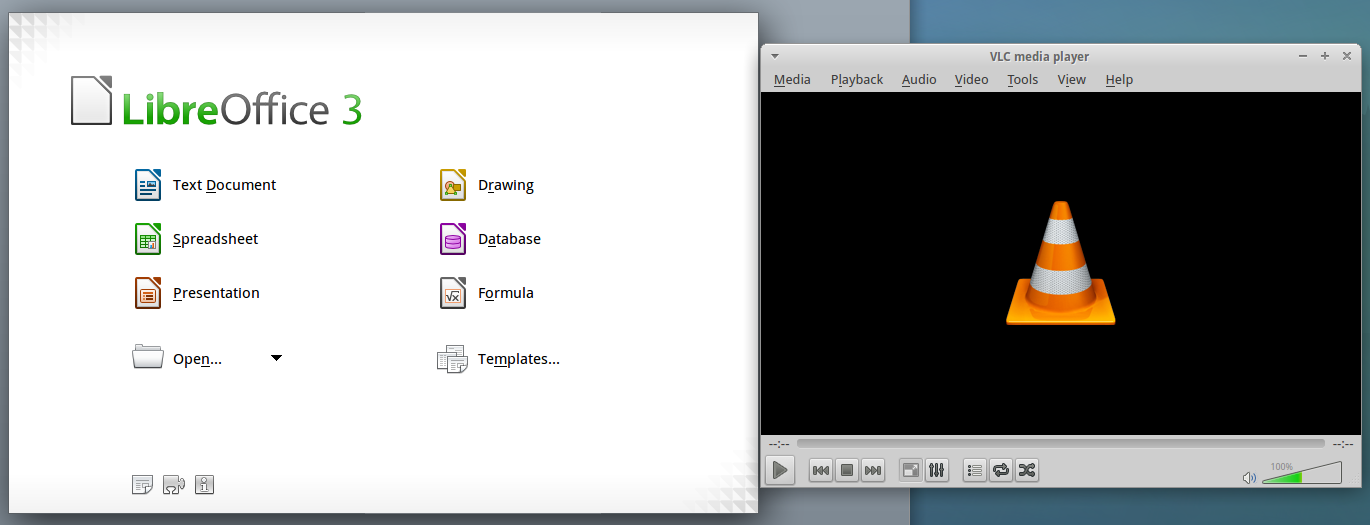
Slave2 installed softwares

Under /etc/puppet your folder/file tree now looks like this.
puppet/
├── auth.conf
├── etckeeper-commit-post
├── etckeeper-commit-pre
├── fileserver.conf
├── manifests
│   └── site.pp
├── modules
│   ├── hellotest
│   │   └── manifests
│   │       └── init.pp
│   ├── inkscape
│   │   └── manifests
│   │       └── init.pp
│   ├── libreoffice
│   │   └── manifests
│   │       └── init.pp
│   └── vlc
│       └── manifests
│           └── init.pp
├── puppet.conf
└── templates
Sources:
Learning Puppet — Basic Agent/Master Puppet
PuppetMaster on Ubuntu 12.04